發表文章

Kali 啟用桌面分享

圖片
1. 到搜尋(放大鏡圖示) 輸入分享 2. 點  螢幕分享 3. 選 需要密碼 4. 設定OK ========================== 別台 要用VNC方式連入, 輸入 該台Kali的IP port: 5900, 密碼就是在 Kali的輸入的密碼 ==========================

Hping用法1

圖片
一個可以傳送ICMP , TCP, UDP, RAW-IP協定 可作為 網路壓力測試 ,   防火牆等設備測試 ,   port 掃描 usage: hping3 host [options]   -h  --help      show this help   -v  --version   show version   -c  --count     packet count   -i  --interval  wait (uX for X microseconds, for example -i u1000)       --fast      alias for -i u10000 (10 packets for second)       --faster    alias for -i u1000 (100 packets for second)       --flood   sent packets as fast as possible. Don't show replies.   -n  --numeric   numeric output   -q  --quiet     quiet   -I  --interface interface name (otherwise default routing interface)   -V  --verbose   verbose mode   -D  --debug     debugging info   -z  --bind      bind ctrl+z to ttl         ...

theharvester 使用~透過搜尋引擎, 找出存在的 email信箱帳號

圖片
這是 透過搜尋引擎 去找尋 指定網域 下 , 存在的 email信箱帳號 這是一種方便工具 Usage: theharvester options        -d: Domain to search or company name        -b: data source: google, googleCSE, bing, bingapi, pgp                         linkedin, google-profiles, people123, jigsaw,                         twitter, googleplus, all        -s: Start in result number X (default: 0)        -v: Verify host name via dns resolution and search for virtual hosts        -f: Save the results into an HTML and XML file        -n: Perform a DNS reverse query on all ranges discovered        -c: Perform a DNS brute force for the domain name        -t: Perform a DNS TLD expansion discovery        -e: Use this DNS server  ...

dmitry使用

圖片
Usage: dmitry [-winsepfb] [-t 0-9] [-o %host.txt] host   -o Save output to %host.txt or to file specified by -o file  (輸出到檔案)   -i Perform a whois lookup on the IP address of a host  (用IP 查whois)   -w Perform a whois lookup on the domain name of a host  (用domain name 查whois)   -n Retrieve Netcraft.com information on a host  (透過Netcraft.com 查詢)   -s Perform a search for possible subdomains   (查詢子網域)   -e Perform a search for possible email addresses   (查詢email)   -p Perform a TCP port scan on a host      (掃描TCP port 1~150) * -f Perform a TCP port scan on a host showing output reporting filtered ports * -b Read in the banner received from the scanned port * -t 0-9 Set the TTL in seconds when scanning a TCP port ( Default 2 )   (設定掃描等待時間) ================================================== 範例: 1. dmitry -iwnse  www.hinet.net  (找尋DNS資料) 2. dmitry -p  www.hinet...

使用fierce 查詢DNS資料

圖片
其實DNS查詢 要的是找正確的電腦及IP 而叁照 DNS server 來源, 可能決定查詢資料 建議使用幾套來查詢 可以用 fierce 查詢DNS資料(可查詢subnet)(暴力方式) 指令: fierce -dns  某個Domainname    -thread 10 -thread (使用10 threads來加快速度) -file  輸出到某個file(txt) 參考:  1.  http://www.rwbnetsec.com/fierce-dns-scanner/

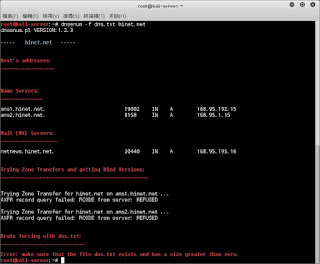
dnsenum說明

圖片
平常查看某一網域的DNS設定 , 可以用nslookup 或外頭網頁(例如: network-tools.com)查詢 但是若你想查藏於裡頭的子網域 名稱 , 就可用 dnsenum 1. 可用內建dns.txt 去查子網域名稱 2. 可透過google搜尋 3. 可對classC執行whois查詢, 來確定該網域的IP範圍 4. 可反向查詢 example: dnsenum -f dns.txt  hinet.net dnsenum -p 5  -s 8  hinet.net 叁考: https://www.youtube.com/watch?v=wPLlhfcy-wg

安裝putty 於kali上

圖片
1. apt-get update 2. apt-get install putty   就可以安裝完成 3. 去搜尋找出putty