發表文章

fierce(資料收集)(查看DNS相關資料)

圖片
這是查看網域相關DNS 指令: sudo fierce -h sudo fierce -domain <網域>

kismet說明

圖片
無線掃描+擷取封包功能 輸入 kismet 先將無線網卡  設定成 監聽模式 變成 wlan0mon Intf 輸入 wlan0mon 按 close console window 指令help: Usage: /usr/bin/kismet_server [OPTION] Nearly all of these options are run-time overrides for values in the kismet.conf configuration file.  Permanent changes should be made to the configuration file.  *** Generic Options ***  -v, --version                Show version  -f, --config-file <file>     Use alternate configuration file      --no-line-wrap           Turn of linewrapping of output                               (for grep, speed, etc)  -s, --silent                 Turn off stdout output after setup phase      --daemonize              Spawn detatched in t...

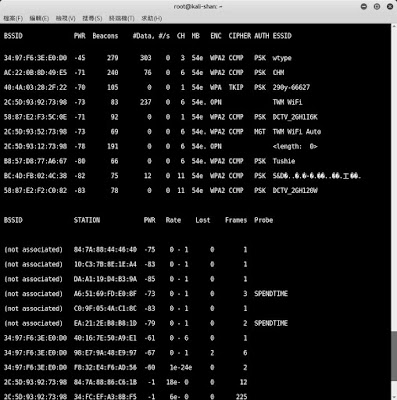
wifi 範圍掃描~使用airodump-ng

圖片
1. 首先 使用 ifconfig   找出無線網卡的名稱(例如: wlan0) 2.  設定無線網卡進入監聽模式, 使用 airmon-ng start  wlan0 3.  使用 ifconfig    找出監聽的新卡名稱(例如: wlan0mon) 3.  執行掃描 ,  airodump-ng wlan0mon ====================================== root@kali-shan:~# ifconfig eth0: flags=4099<UP,BROADCAST,MULTICAST>  mtu 1500         ether 00:c0:6c:81:00:fe  txqueuelen 1000  (Ethernet)         RX packets 0  bytes 0 (0.0 B)         RX errors 0  dropped 0  overruns 0  frame 0         TX packets 0  bytes 0 (0.0 B)         TX errors 0  dropped 0 overruns 0  carrier 0  collisions 0 eth1: flags=4163<UP,BROADCAST,RUNNING,MULTICAST>  mtu 1500         inet 192.168.8.150  netmask 255.255.255.0  broadcast 192.168.8.255         inet6 fe80::213:74ff:fe00:5c38  prefi...

dropbox安裝於kali

圖片
有二個方法: 一是 透過指令    一是 透過軟體更新 ********* 透過指令 ********* 設定步驟: 1. 32位元: wget -O - "https://www.dropbox.com/download?plat=lnx.x86" | tar xzf - 64位元: wget -O - "https://www.dropbox.com/download?plat=lnx.x86_64" | tar xzf - 2. 更改名稱:dropbox.py 3. python ~/dropbox.py start 左下方會有一個隱藏箭頭>點一下就會出現 ********* 透過軟體更新 *********

Kali說明文件訊息的app

圖片
這...沒想到Kali Linux 有手機版APP 但不是執行系統, 而是提供官方訊息及文件 讓喜愛者閱讀 歡迎下載: Kali Linux 2 0 Tutorials_v1.1 Kali Linux Manuales

p0f ~辨識系統工具

圖片
其實ping 的TTL 數字   是代表不同做系統 例如: window 是128, Linux是64, CISCO設備常常大於255 但這樣使用 已經很少....因為 不是很準確,也有許多軟體取代更精準 所以參考使用 指令說明: root@kali-linux2:~# p0f -h --- p0f 3.07b by Michal Zalewski <lcamtuf@coredump.cx> --- ./p0f: invalid option -- 'h' Usage: p0f [ ...options... ] [ 'filter rule' ] Network interface options:   -i iface  - listen on the specified network interface   -r file   - read offline pcap data from a given file   -p        - put the listening interface in promiscuous mode   -L        - list all available interfaces Operating mode and output settings:   -f file   - read fingerprint database from 'file' (p0f.fp)   -o file   - write information to the specified log file   -s name   - answer to API queries at a named unix socket   -u user   - switch to the specified unprivileged account and chroot   -d        - fork into ...

nbtscan用法

圖片
偵測網路上NetBIOS的電腦名稱, 服務, Mac address, IP等資料 =========================================== NBTscan version 1.5.1. Copyright (C) 1999-2003 Alla Bezroutchko. This is a free software and it comes with absolutely no warranty. You can use, distribute and modify it under terms of GNU GPL. Usage: nbtscan [-v] [-d] [-e] [-l] [-t timeout] [-b bandwidth] [-r] [-q] [-s separator] [-m retransmits] (-f filename)|(<scan_range>) -v verbose output. Print all names received from each host -d dump packets. Print whole packet contents. -e Format output in /etc/hosts format. -l Format output in lmhosts format. Cannot be used with -v, -s or -h options. -t timeout wait timeout milliseconds for response. Default 1000. -b bandwidth Output throttling. Slow down output so that it uses no more that bandwidth bps. Useful on slow links, so that ougoing queries don't get dropped. -r use local port 137 for scans. Win95 boxes respond to this only. ...